Blog 2
How to get organization-wide visibility into AWS Marketplace purchases
By Elhadj Barry, Atif Saeed, and Juan Palazuelos | April 16, 2025 | in Amazon Q, AWS Cloud Financial Management, AWS Marketplace, Best Practices, Billing & Account Management, Business Intelligence, Enterprise governance and control, Management & Governance, Technical How-to, Thought Leadership
Managing software assets across multiple Amazon Web Services (AWS) accounts creates challenges for large organizations using AWS Organizations. Enterprise IT administrators need better ways to track and control software purchases from independent software vendors (ISVs) across their accounts.
Organizations often struggle with manually tracking software assets—sometimes using spreadsheets—which can lead to poor visibility, weak cost management, missed renewal deadlines, and lost negotiation opportunities. The AWS Marketplace Procurement insights dashboard offers a centralized, no-additional-cost way to manage software transactions across accounts.
This post introduces the AWS Marketplace Procurement insights dashboard, which provides organization-level visibility into AWS Marketplace transactions. Learn how the tool improves transparency and control and enables strategic decisions for your AWS Marketplace procurement.
Solution overview
The AWS Marketplace Procurement insights dashboard centralizes visibility and management of AWS Marketplace transactions across the enterprise. It shows all ISV software agreements, billed amounts, renewals, and end dates in one place.
You access the dashboard through the AWS Marketplace console or embed it in your tools via API. The dashboard provides the following key capabilities:
Centralized visibility – See all AWS Marketplace software subscriptions and agreements in one place, including the purchasing AWS account ID, offer IDs, offer type, agreement ID, and agreement start and end dates.
Cost analysis – View AWS Marketplace spend data, including invoiced metrics for specific time ranges, to support financial planning and budget management.
Audit and compliance – Track when terms were accepted, with timestamps, account details, and agreement history. This creates a reliable audit trail of your AWS Marketplace spend to support organizational policies and industry regulations.
Setting up the dashboard
The dashboard pulls data from AWS sources to deliver an organization-wide view. Before you use it, complete the steps below. Only management account users or authorized administrators can access this dashboard. For registering and deregistering delegated administrators, see Using delegated administrators in the AWS documentation.
Enable all features in AWS Organizations. For instructions, see Enabling all features for an organization with AWS Organizations.
Add the following permissions to your IAM policy to view and use the dashboard:
aws-marketplace:GetBuyerDashboardorganizations:DescribeOrganization
Add the following permissions to your IAM policy to enable the dashboard:
iam:CreateServiceLinkedRoleorganizations:EnableAWSServiceAccessorganizations:DisableAWSServiceAccessorganizations:DescribeOrganizationorganizations:ListAWSServiceAccessForOrganizationorganizations:ListDelegatedAdministrators(required to manage delegated administrators)organizations:DeregisterDelegatedAdministrator(required to manage delegated administrators)
Turn on AWS Marketplace procurement insights in the AWS Marketplace console settings. This creates a service-linked role and enables trusted access so AWS Marketplace can read the information it needs from AWS Organizations. For details, see Activating the dashboard.
Data in the Procurement insights dashboard is ingested and validated from multiple sources. New AWS Marketplace transactions can take more than 24 hours to appear in the dashboard.
Features and how to use them
To open the dashboard:
Sign in to the AWS Management Console and open the AWS Marketplace console. You need management account root or delegated administrator permissions to access the dashboard.
In the management account or registered delegated administrator account, choose Procurement insights, as shown below. If you have not activated the dashboard, see Enabling the Procurement insights dashboard.
The AWS Marketplace Procurement insights dashboard has two main areas:
- Cost analysis tab – View spend data on your organization’s AWS Marketplace purchases.
- Agreements tab – Track active and expired AWS Marketplace agreements across the organization. (Expired agreements in this view are tracked only from when the feature was enabled.)
The AWS Marketplace Procurement Insights dashboard shows the Cost analysis and Agreements tabs for procurement data, agreements, and spend visibility.
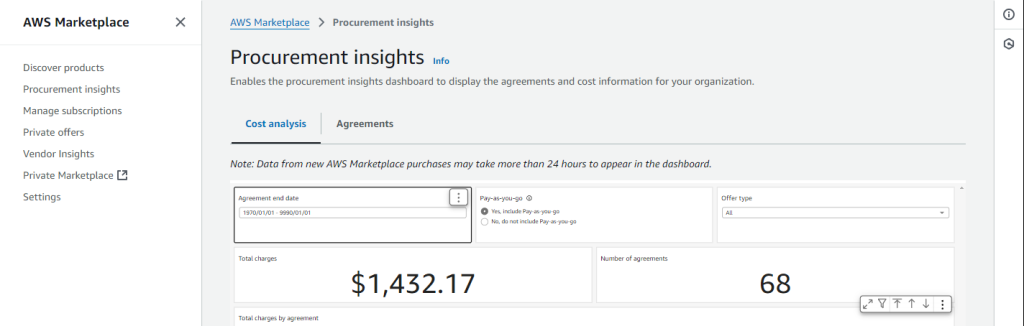
Figure 1: AWS Marketplace Procurement Insights home page – access Cost analysis and Agreements data
Cost analysis view
When you open the Procurement insights dashboard, the default view is the Cost analysis tab. You have three options to filter your data:
The AWS Marketplace Procurement Insights dashboard shows cost analysis by agreement, seller, product, and account, with total cost across agreements.
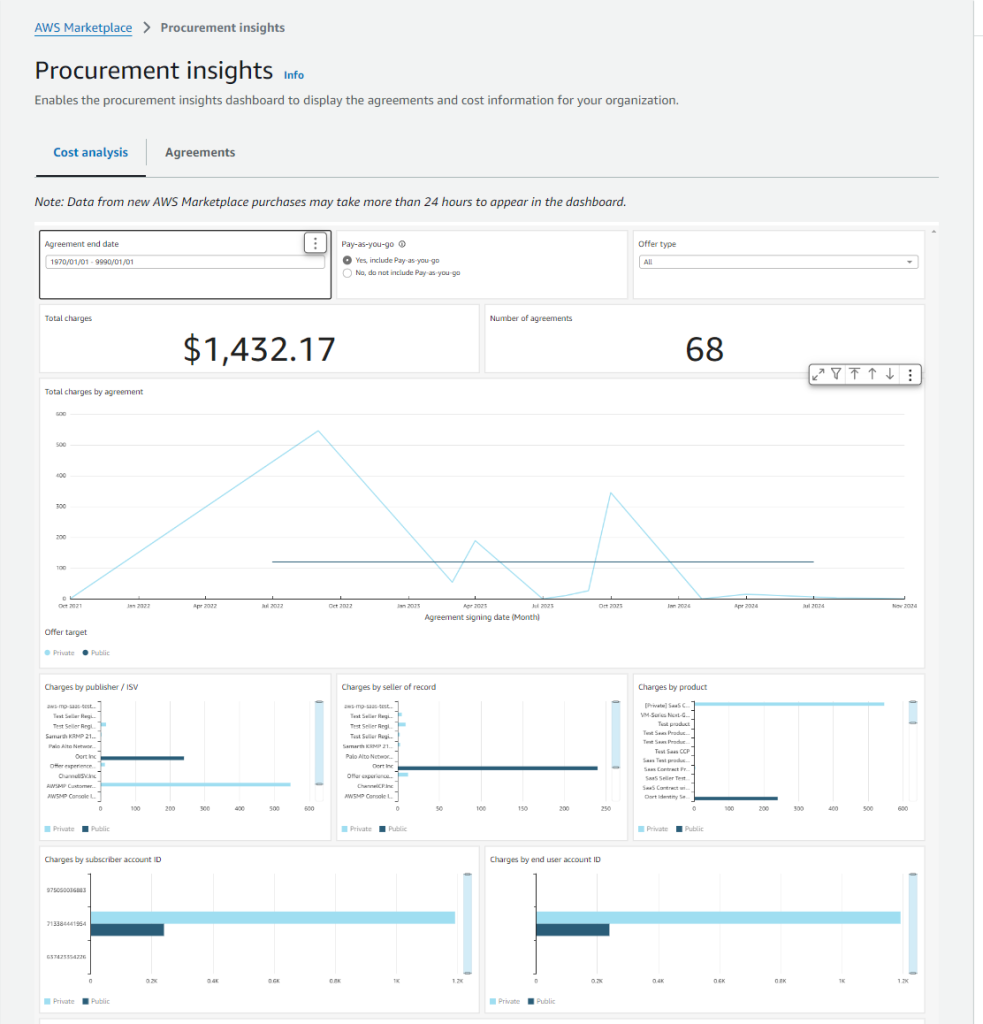
Figure 2: AWS Marketplace Procurement Insights dashboard – cost analysis by Agreement, Seller, Product, and Account
Invoice date – Filter agreements based on when they were invoiced.
Pay-as-you-go – View annual options and agreements excluding pay-as-you-go agreements.
Offer type – Filter by offer type, such as private or public offers.
The Total charges section shows the total amount your organization has spent on AWS Marketplace agreements. This includes spend from active agreements and past agreements.
The Number of agreements section shows how many AWS Marketplace agreements your organization has, including current and historical agreements.
The Total charges by agreement time-series chart shows AWS Marketplace charges by agreement. This view shows how many agreements were invoiced in the selected time range, not the total count of existing agreements. “Free Trial Agreements” or “Free Product Agreements” are excluded because only agreements with related billing events are recorded.
Retrieving source data
You can download data for analysis outside AWS Marketplace or for use in other tools. To export data:
Use the filters at the top of the page to narrow the data.
In the upper-right corner of the table, open the overflow menu (vertical three dots).
Choose the data export option.
The screenshot below shows the Procurement Insights dashboard Cost analysis view.
Agreements view
The Agreements tab shows all your agreements, including active and expired ones. Use this view to track when agreements expire and how your organization uses AWS Marketplace agreements over time. Expired agreements are tracked only from when the feature was enabled.
Filter agreements using:
Agreement end date – Filter agreements by end date.
Pay-as-you-go – Include or exclude pay-as-you-go agreements within annual options and agreements.
Offer type – Filter by offer type, such as private or public offers.
The Active agreements section shows the total number of current agreements.
The Expired agreements section shows the total number of agreements that are no longer active.
The Procurement insights Agreements view offers multiple ways to visualize your data. The Agreements by days until expiration chart shows how many agreements will expire in different time windows.
The New agreements trend section shows a trend line for when your organization signed agreements over time.
Retrieving source data
Download data for analysis outside AWS Marketplace or for use in other tools. To export:
Use the filters at the top of the page to refine the data.
In the upper-right corner of the chart, open the overflow menu (three dots).
Choose export data.
The AWS Marketplace Procurement Insights dashboard shows active and expired agreements, agreement expiration distribution, new agreement trends, and product-level agreement metrics.
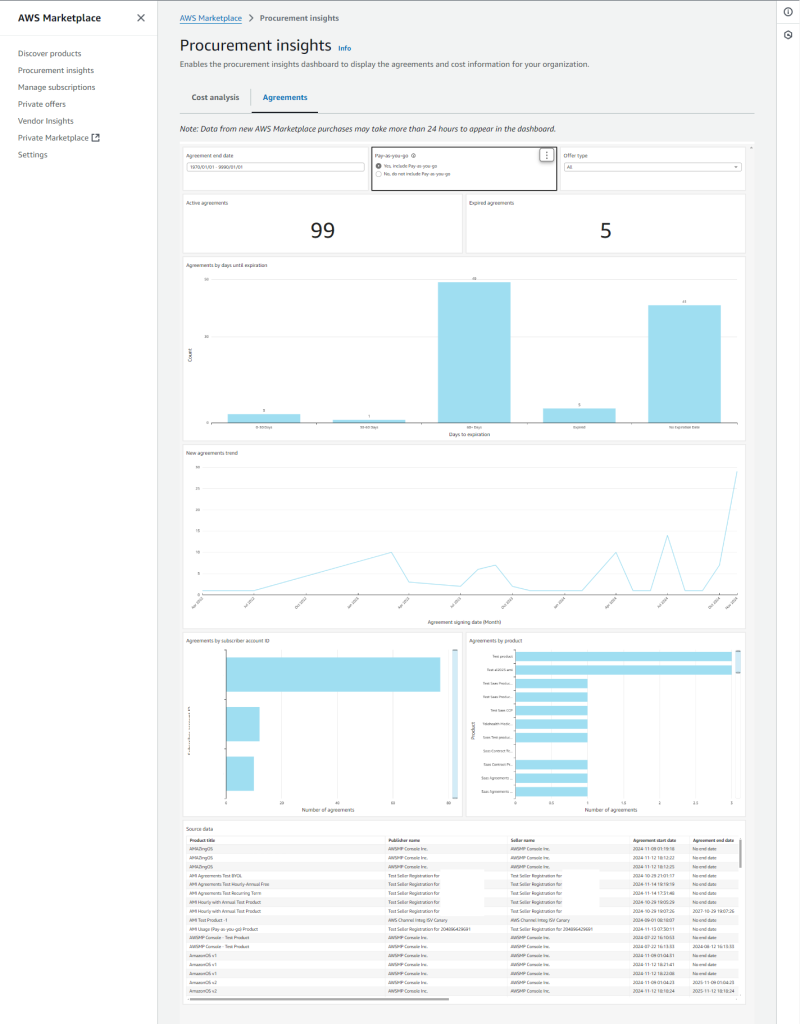
Figure 3: AWS Marketplace Procurement Insights dashboard – Agreement metrics with active agreements, expiration trends, and product-level analysis.
Accessing agreement data
To view and export your organization’s AWS Marketplace agreement data from any widget on the dashboard:
In the upper-right corner of the chart, open the overflow menu (vertical three dots).
Choose the data export option.
Viewing summary data
Quickly see aggregated information for agreements shown in the chart using View summary data. This summary view provides a concise analysis, including total agreements in different expiration windows, key metrics for agreement management, and agreement types (such as private or public offers).
By reviewing summary data, you can spot patterns—such as many agreements nearing expiration—which can drive early negotiation or renewal discussions with vendors.
Export agreement data directly to CSV with Export to CSV for easier analysis, reporting, or integration with other asset or procurement systems. You can combine AWS Marketplace spend data with other software costs to:
Find opportunities to reduce spend.
Identify software licenses you may be able to consolidate.
Plan software budgets more effectively.
This is especially valuable for large organizations managing many AWS accounts. IT and finance teams use this export to bring AWS Marketplace data into broader asset-tracking or budgeting tools, improving financial planning and vendor management. The exported CSV includes important fields such as:
Account ID – Identifies which AWS account the agreement is associated with.
Product name – The specific software, professional service, or dataset from AWS Marketplace.
Vendor and offer type – Vendor information and whether the offer is private or public.
Agreement start and end dates – When the agreement begins and ends.
Terms and payment schedule – Payment details such as pay-as-you-go status or scheduled payments.
Charts from the Procurement insights dashboard show agreement counts by subscriber account ID and by product, including top vendors.
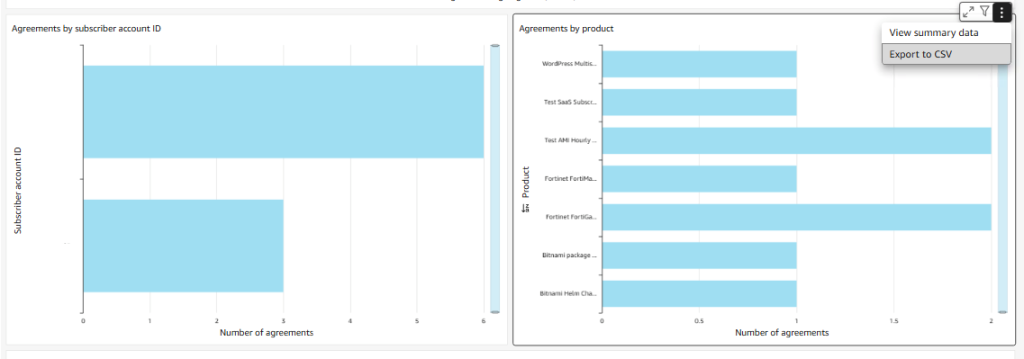
Figure 4: Agreements by Subscriber Account and Product in the AWS Marketplace Procurement Insights dashboard.
How this dashboard differs from other AWS tools
AWS offers many governance tools, but the Procurement insights dashboard stands out by providing Marketplace-specific capabilities at no additional cost, without requiring other AWS services or fees for full functionality.
By contrast, AWS Billing and Cost Management show charges or line items when software usage incurs cost, but they do not include agreement-level detail. Similarly, AWS Cost Management provides high-level detail (for example, product name and incurred cost) but does not include AWS Marketplace agreement data.
For customers who do not use the AWS console, the Single Pane of Glass (SPG) dashboard—which requires an AWS QuickSight license—combines data from AWS Cost and Usage Reports (CUR) and AWS License Manager. While it provides visibility across cost, audit, and licensing for multiple organizational units (OUs) outside the AWS Management Console, it does not tie that data to AWS Marketplace agreement details.
Conclusion
With the Procurement insights dashboard, AWS Marketplace introduces a powerful tool for procurement teams to gain transparency and control over ISV software assets purchased through AWS Marketplace across the organization. It simplifies cost analysis and provides visibility into spending patterns to support strategic procurement decisions.
Resources
About the authors

Elhadj Barry is a solutions architect specializing in AWS Marketplace in Washington, DC, focused on AWS Marketplace governance and security. He is passionate about using AWS services to build innovative solutions that deliver business value and outcomes.

Atif Saeed is a senior product manager at AWS Marketplace, focused on improving the buying experience and helping organizations optimize their ISV software investments. Through his work, Atif aims to give customers better insight into procurement, simplify license management, and unlock more value from software transactions on AWS Marketplace.

Juan Palazuelos is a senior software development engineer who has launched two public AWS Marketplace services. Juan focuses on building scalable solutions that improve the AWS Marketplace customer experience.